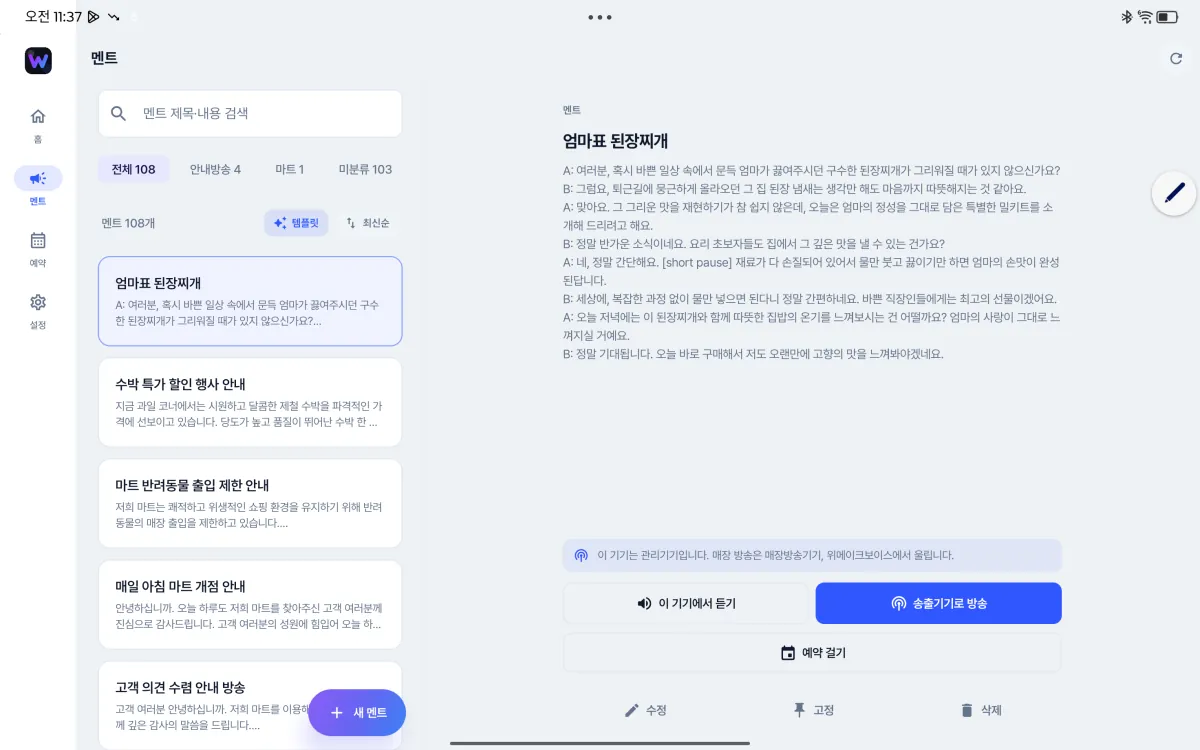
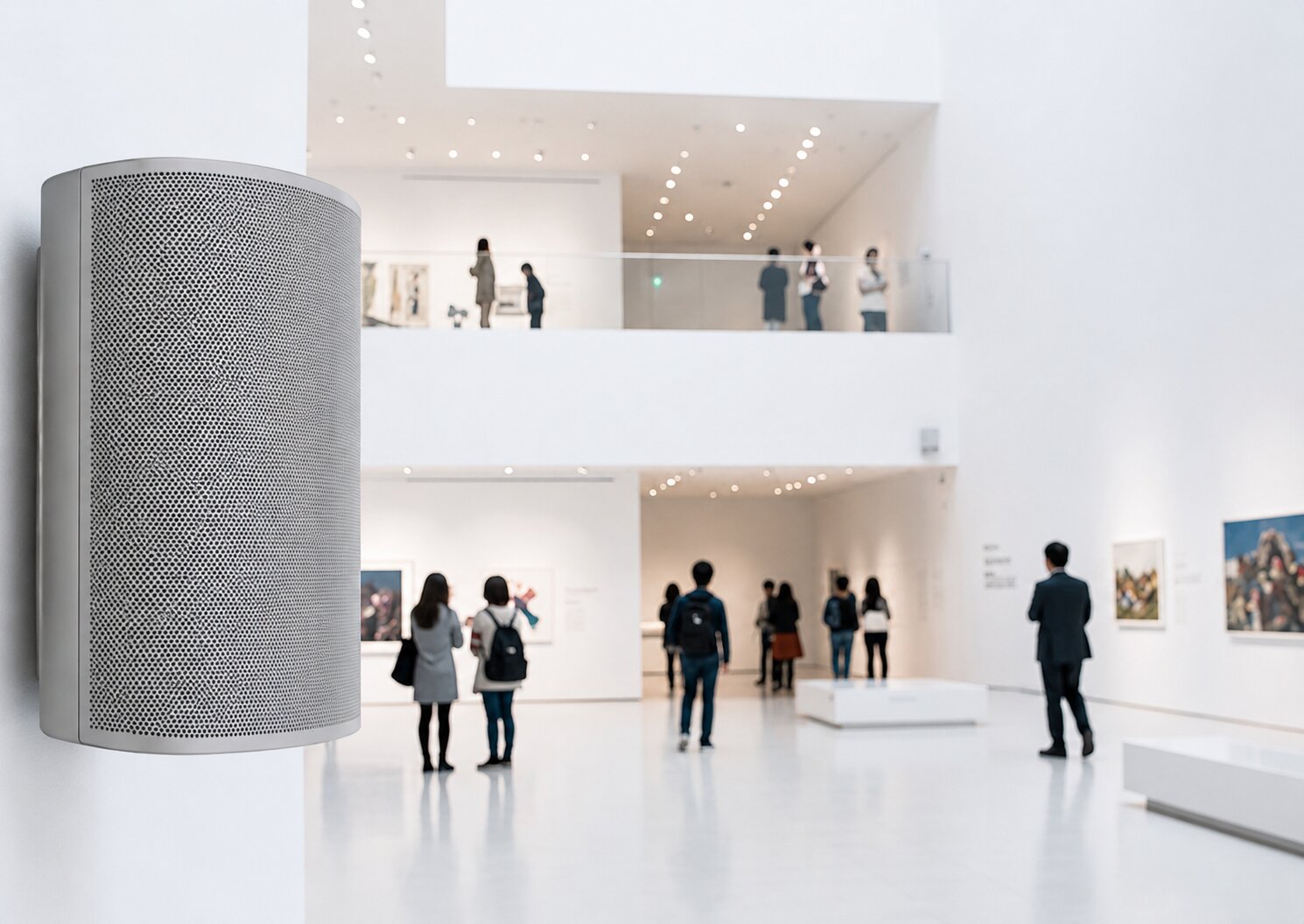
Announcement speakers installed in an exhibition space
LIVE · airing
"May we have your attention. Shortly, there will be a commentary on artist Seo Jeong-gyu's work."
AI Announcement · BROADCAST

"May we have your attention." Now WeMakeVoice plays this broadcast for you, on schedule every day.

Cafe, apartment, nursing home, mart, government office, park — wherever you are, just enter your script and set a time. It plays on its own in a clear voice at the same time every day, in a voice that suits your space, chosen from 984 AI voice actors across 40 languages.

Make your first broadcast in 5 minutes Try it for one month
984 AI voice actors 40 languages 2,000+ active sites
Public institutions and businesses nationwide use WeMakeVoice announcements
Hanaro Mart Changwon Facilities Corporation Seocho Cultural Foundation Kakao Entertainment Gwangmyeong City Gyeonggi Tourism Organization Korea National Park Service Gwacheon City
REAL USE CASES

Here's how they're using announcements.

Use the Hear sample button to instantly check announcements used on real sites.

Jirisan National Park

Jirisan National Park

Korea National Park Service

Jirisan National Park runs regularly scheduled announcements. It has provided stable broadcasts for years and offers increasingly professional national-park guidance.

Hanaro Mart

Hanaro Mart

Hanaro Mart

Hanaro Mart airs a variety of announcements on repeat at minute intervals every day — deals, event news, and community info. It's optimized for mart announcements.

Gwangmyeong Cave

Gwangmyeong Cave

Gwangmyeong Urban Corporation

Gwangmyeong Cave sets daily schedules for regular announcements. As a tourist site with many foreign visitors, it also provides English announcements and on-demand broadcasts as needed.

Doosan We've The Zenith

Doosan We've The Zenith

Apartment announcements

Broadcast all kinds of apartment announcements with crystal-clear pronunciation in a single click. If you currently use microphone announcements, try it right now! Experience apartment announcements on a whole new level.

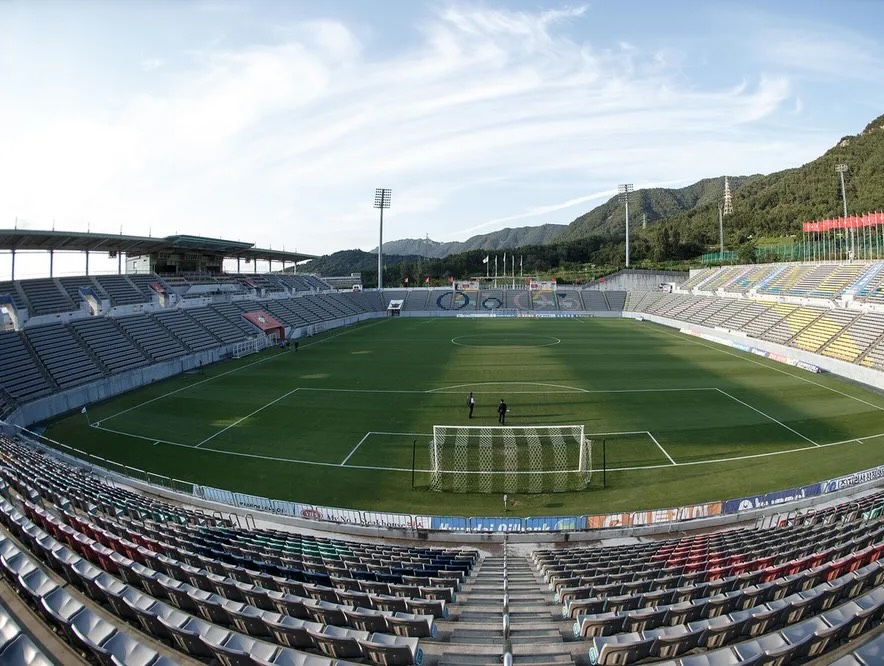
Changwon Football Center Gym

Changwon Football Center Gym

Changwon Facilities Corporation

Announcements deliver warm-ups, etiquette, and safety rules so citizens can use the facility safely and comfortably. They play a key role in preventing accidents and creating an orderly environment.

Cafe Astana

Cafe Astana

Cafe announcements

It schedules regular notices and instantly pages customers for completed orders. With the upgraded broadcasts, the cafe was reborn as a more refined, premium space — cafe announcements that let even a cafe sound high-end.

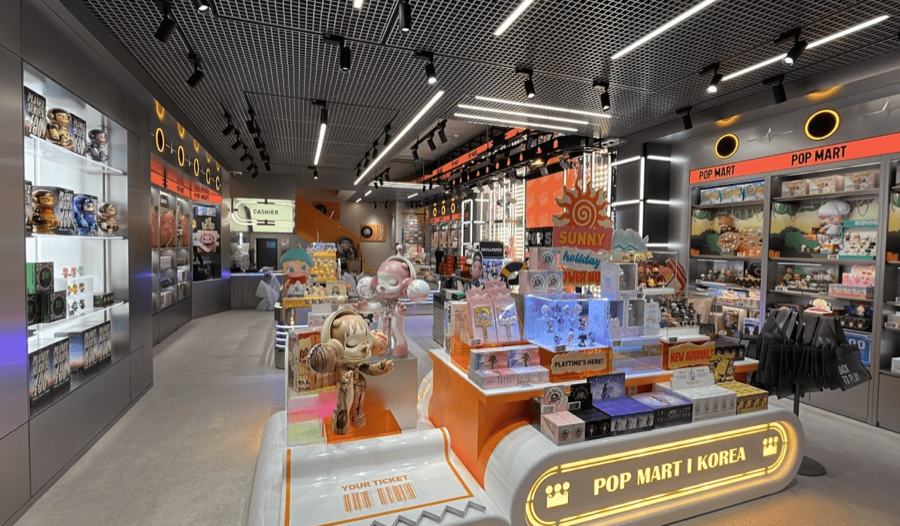
POPMART

POPMART

Multilingual store guidance

It runs back-to-back announcements in Korean, English, Japanese, and Chinese covering what domestic and overseas customers need to know.

Ulleung Cruise

Ulleung Cruise

Pier announcements

At the pier, the announcement service quickly and accurately delivers boarding times and urgent notices such as weather changes and sailing delays — an essential tool for smooth operations and passenger safety.

Announcements in use at a care facility
CARE FACILITY

Nursing homes and nursing hospitals use it conveniently too.

It provides a systematic, reliable broadcast system — from everyday notices like meal times, program guidance, and visit reminders to emergencies.

Care facility client logo 1
Care facility client logo 2
Care facility client logo 3
Care facility client logo 4
Care facility client logo 5
Care facility client logo 6
AI ASSISTANT

Announcements — now AI helps.

Don't worry about complex wording or foreign-language translation. Experience announcements finished in just seconds.

Anyone can write a script in 3 seconds

Translate into many languages at once

NEW LAUNCH

In-Store Music Broadcasting

In stores, hospitals, cafes, malls — anywhere — pick a music channel that fits the mood and air it automatically alongside scheduled announcements. When a broadcast starts, the music lowers naturally and resumes when the announcement ends.

01

Music channels across genres

Choose to match your industry and mood — latest hits, ballads, classical, and even seasonal and themed channels.

02

Music auto-play schedule

Set a schedule to turn music on and off at the times you want, and auto-play closing music before business hours end.

03

Announcements and music together

When an announcement plays, the music volume lowers smoothly and resumes when the announcement ends.

#Cafe BGM selection#Cozy music for cafes#Lo-fi for focus #Standard jazz classics#Japanese city pop vibes#Relaxing piano melodies #Deep-sleep playlist#Gentle music for sleep#Piano #Calm music#Classical#Chuseok special#Christmas special#Themed channels
MUSIC APP INTEGRATION

Broadcast in sync with the music app you already use.

It automatically adjusts your music app's volume when an announcement airs. Integrate with various streaming services to build a professional broadcast system. * WeMakeVoice installer required

YouTube logo
YouTube Music logo
Melon logo
Spotify logo
Genie Music logo
Construction sites · safety managers

Construction-site safety broadcasts, automatic and matched to the feels-like temperature.

Safety managers no longer have to check the temperature and grab the mic each time. Set the site's region and broadcast times, and it checks the weather service's observation data and automatically airs heat-wave safety scripts matched to the feels-like-temperature level through the on-site speakers.

  • See the selected site's temperature, humidity, and hourly forecast at a glance
  • Safety scripts and rest guidance for feels-like levels of 31, 33, 35, and 38°C
  • Auto-broadcasts at 1- or 2-hour intervals; warning and danger levels can require approval before airing
A construction-site safety manager checking automatic safety broadcasts matched to the weather service's feels-like temperature Weather auto broadcast · running
Current feels-like temp 34.8°C
Current level Caution
Next broadcast 14:00 auto
01 Set the site region and times

Choose the city/county/district and broadcast interval, and pick the safety scripts that fit the site.

02 Auto-check weather-service data

At each set time, it checks the latest temperature and humidity to calculate the site's feels-like temperature and level.

03 Air the AI broadcast for that level

The current feels-like temperature and guidance to rest or pause work are broadcast automatically in a clear AI voice.

Here's what happens now

Set it up once and it plays on its own, on schedule every day.

Pick a voice, set the script, and schedule the time — WeMakeVoice handles the rest. Lunch notices, closing notices, seasonal events — all aired precisely, at the same time and in the same tone, every day.

60 seconds
Just once

From AI script writing to scheduling, in just 60 seconds

Pick a voice, enter a few keywords, and AI writes the script and reads it aloud. Just set the airing time and you're done — the whole process takes 60 seconds, and your first broadcast plays.

On schedule daily
Auto airing

At the set time, without fail

Schedule daily broadcasts like lunch, closing, and shift-change notices just once, and they go out the same way at the exact time even when no one's there.

984
WeMakeVoice

Every space suits a different voice

Warm for a cafe, clear and measured for a nursing home, lively for a mart. Choose from 984 AI voice actors and 40 languages, and announce in the tone that fits your space.

Where it's used

Different industries, the same challenge.

Recycling notices at an apartment office, order calls at a cafe, meal notices at a nursing home
Only the names differ — they're all 'broadcasts that repeat every day.'
We've gathered stories from places that handed that job to WeMakeVoice. Find the card that most resembles your space.

Apartment complex office

Manager · security office

Resident notices, parking guidance, recycling days, pest-control schedules. Set it once to air automatically by building and time slot.

"Even quarterly broadcasts like fire-drill and routine pest-control notices — just put them on the calendar and you're done."

Cafe / bakery

Owner · manager

Order calls, closing notices, seasonal promotions flowing with BGM — in a calm tone that doesn't disrupt the store's atmosphere.

"We swapped buzzers for a voice that warmly calls customers by name, and the whole mood changed."

Nursing home / day care

Director · social worker

Meal notices, medication times, program starts — in a slow, senior-friendly voice that's clear and easy for elders to understand.

"The same staff member used to grab the mic and shout every time; now we spend that time with the residents."

Small-to-mid mart / convenience store

Owner · store manager

Deal announcements, stock alerts, one-hour-to-close notices. The broadcasts never get missed, even with just one or two staff.

"Even late at night with a single staff member, the scheduled broadcast goes out precisely every 30 minutes."

Government office / public facility

Civil service desk · facility management

Service-desk guidance, hours, government standard scripts, emergency notices — the info visitors hear most, in a consistent tone.

"The time desk staff spent on the mic is gone, so they can focus on their actual work."

National park / tourist site / cave

Visitor center · management office

Trail guidance, safety cautions, multilingual announcements — Korean, English, Chinese, and Japanese blend naturally in one script.

"We have many foreign visitors, and after automatic four-language broadcasts, info-desk inquiries dropped by half."

Clinic / pharmacy

Administration · pharmacist

Queue-number calls, appointment guidance, prescription pickup alerts — precisely, using anonymous numbers without exposing patient names.

"We switched to a clear, easy-to-hear voice for elderly patients, and missed calls disappeared."

Gym / studio

Owner · trainer

Five-minutes-to-class notices, closing notices, membership info — so trainers can focus on class.

"With class-start alerts going out precisely, late arrivals dropped by 30%."

And more — every space

Internet cafes · salons · academies · gas stations · museums …

Anywhere there's "the same announcement at the same time every day." Sign up and your first broadcast plays in 5 minutes.

"If the script is fixed, there's no reason for a person to shout it."
AUTOMATED OPERATIONS

Even complex broadcast operations run automatically once set up.

01

When one broadcast ends, another follows automatically

Set it up once and when broadcast A ends, B, C, and D play in sequence automatically. Enjoy Korean, English, Chinese, and Japanese guidance flowing naturally in department stores, airports, and hotels. Specify the follow-up broadcasts you want to deliver varied languages and messages without interruption.

02

Repeat announcements automatically, at any time and interval you want

For today only or for every future date, freely set start and end times and repeat announcements automatically at the interval you want (e.g., 10 minutes, 30 minutes, 1 hour). Set the recurring schedule once and you're done! Without broadcasting manually each time, announcements go out automatically on schedule, making operations far easier.

03

Upload any audio file and start announcing right away

Upload any audio file — jingles, promo music, or scripts you recorded yourself — and you can broadcast live or schedule it right away. Build the broadcast you want without worrying about file formats, so anyone can get started easily.

04

Beyond listening, now it shows captions too

When an announcement plays, captions appear simultaneously on a separate screen so customers can follow along more easily. Even when audio is hard to hear or the surroundings are noisy, captions let people read the content immediately, greatly improving accessibility and convenience. With caption broadcasts you both hear and see, anyone can follow guidance more easily.

PRODUCT DETAILS

A closer look at the features announcements need.

01

Hundreds of announcement templates

Stop agonizing over what to say! Broadcast right away with ready-made scripts for every situation.

Hundreds of announcement templates
02

Languages worldwide, a variety of voices

40 languages supported! Broadcast with a variety of announcer voices.

Languages worldwide, a variety of voices
03

Review broadcast history

Review your broadcast history by period with ease — you can also download it as Excel.

04

Easy report creation

Need to turn broadcast history into a report? Create, save, and print reports in just a few clicks!

05

Turn frequent broadcasts into scheduled ones

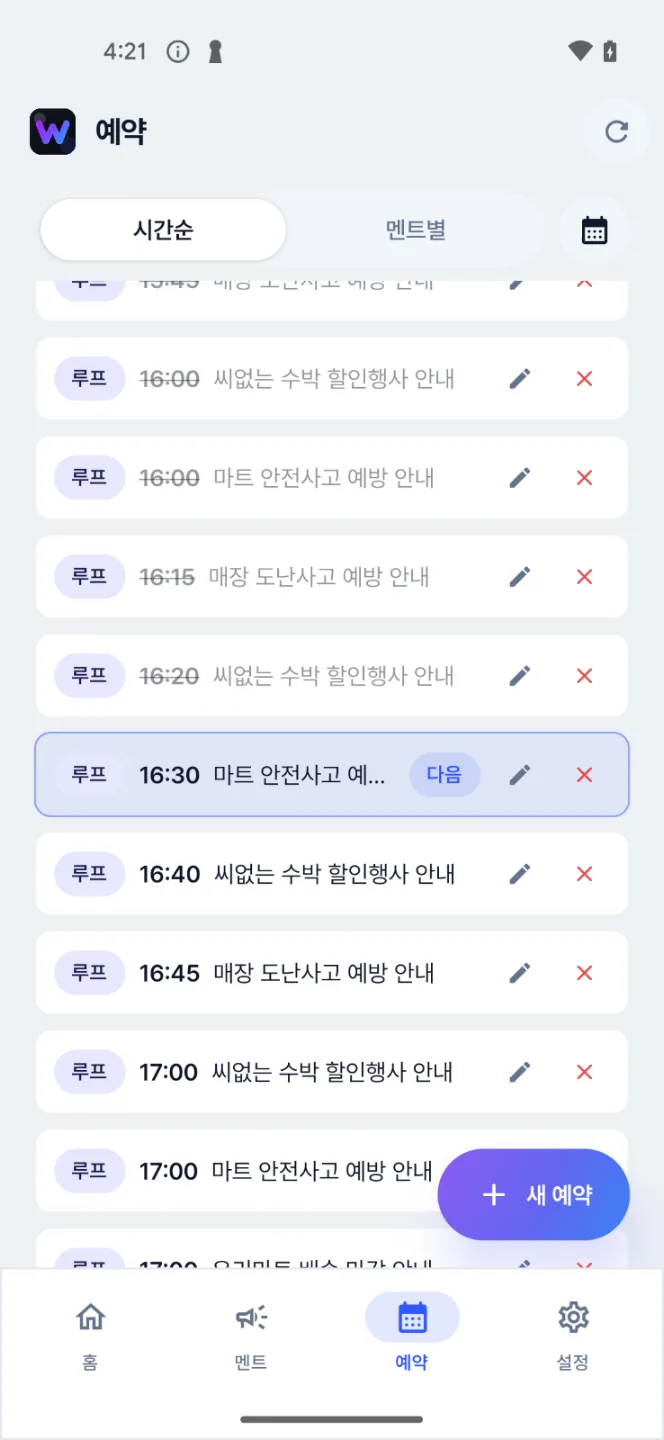
Schedule recurring announcements as single, weekly, or monthly reservations.

06

Scheduled broadcasts at a glance

See your broadcast schedule at a glance on the calendar, and edit or delete reservations on the spot.

07

Fine-tune to the situation

Deliver broadcasts that fit the moment with speed, background music, sound effects, chimes, and more.

FEATURES

Everything in broadcast operations, on one screen.

Scheduling · repeats · follow-ups

Schedule once, automatic forever.

Daily 11:30 lunch notice, Tue/Thu 14:00 event notice, a 30-minutes-before alert + a just-before alert + an ending-soon alert — register them as one bundle and you're done.

Daily · weekday · date · period Register any pattern.
Automatic follow-up broadcasts — Bundle and schedule follow-up scripts like "closing in 30 minutes."
Pause · auto-skip holidays — Automatically skips public holidays and days off.
Broadcast log — Records which script aired and when.
Today's schedule
09:00 Opening greetingDaily repeat · business days ● Done
11:30 Lunch-time noticeDaily 11:30 · whole store ● Done
14:55 30% off fresh foodEvery Fri · follow-up 15:25 ending soon ● Airing
15:25 Sale ending soon14:55 follow-up · auto ↻ Follow-up
17:00 2 hours to closeDaily 17:00 · whole store ● Waiting
19:50 Closing noticeBusiness days 19:50 · whole store ● Waiting
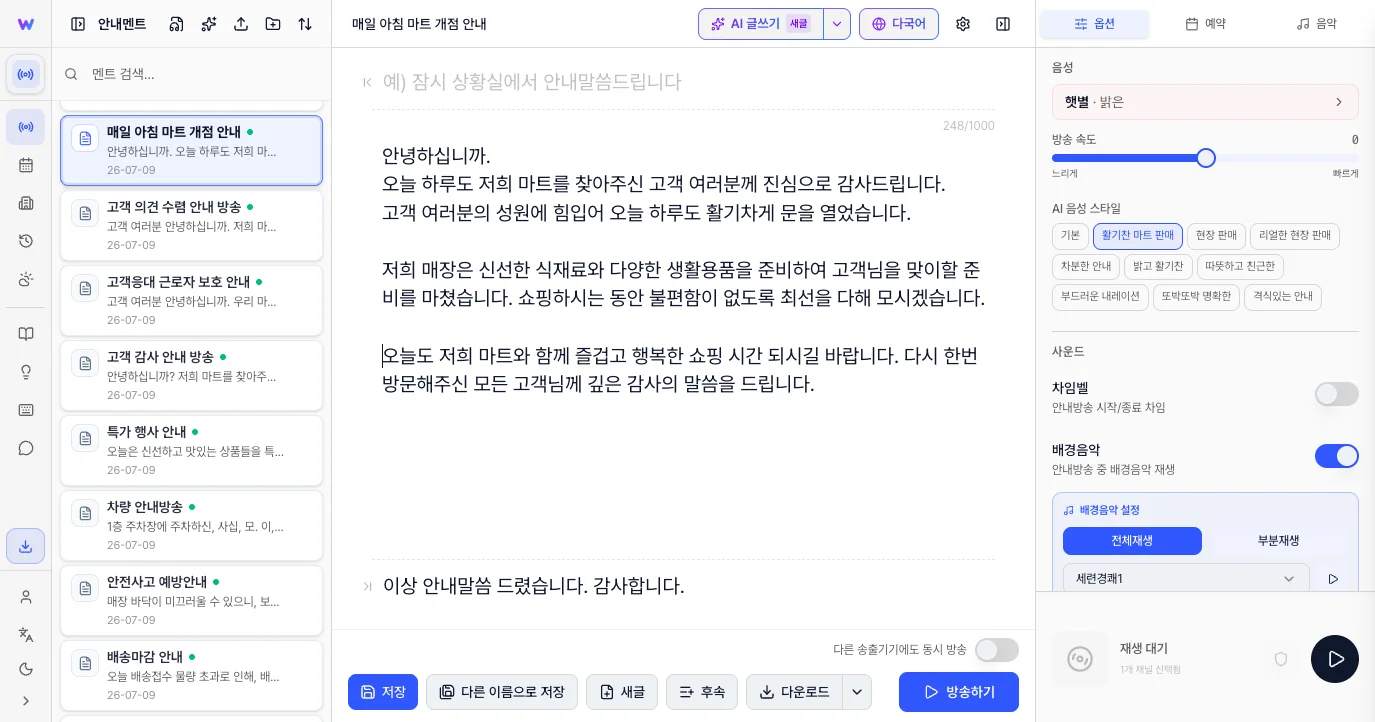
AI script assistant · captions · multilingual

"Write a script for 30% off iced drinks for summer."

Ask in one line and a natural announcement script comes out — auto-translated into other languages, with captions for digital signage included.

AI script assistant — Just set the tone (friendly/formal/urgent) and length, and scripts are written automatically.
Auto-translation — One script in Korean, English, Chinese, and Japanese at once — perfect for places with many foreign customers.
AI script assistant
YOU Make a 25-second script in a friendly tone for 30% off iced drinks this summer.
WeMakeVoice AI
"Hello, valued customer. On this hot summer day, why not cool off with a refreshing iced drink? For one week starting today, all iced menu items are 30% off. Order a cup full of cool refreshment at the counter now."
🇰🇷 Korean 🇺🇸 English 🇨🇳 Chinese 🇯🇵 Japanese Captions ↓ SRT
Connect Broadcast Equipment

Just use the speakers your store already has.

No need to buy new equipment. Connect the cloud to the PA amplifier, ceiling speakers, and BGM system your store already has. If you have internet, you're set.

PC speaker mode — Just install the program on the counter PC; no extra equipment needed.
Mobile airing — Broadcast instantly from the owner's phone via the app.
📱
Operator

Write scripts on web or app

WeMakeVoice cloud

AI voice generation · schedule management

🔊
Store speakers

Broadcast box / PC / mobile

Compatible with the PA system your store already has. As long as the internet's connected, you're good.

VOICES

984 AI voice actors. 40 languages.

Matched to your store's mood — warm, firm, calm, friendly. Including senior-friendly voices, children's voices, and native foreign-language voices.

Seoyun
Warm
Minjun
Trustworthy
Haru
Lively
Noa
Calm
Jiwoo
Friendly
Siwoo
Senior-friendly
Yuna
Firm
+517
View all
40 languages · partial
KoreanEnglish (US)English (UK)中文 (简体)中文 (繁體)日本語 EspañolFrançaisDeutschItalianoPortuguêsРусский Tiếng ViệtภาษาไทยBahasa Indonesiaहिन्दीالعربية+ 23 more
PRICING

Enough if you run a single location.

Start free with no credit card.

1-month free trial — Start without registering a card, and the trial ends automatically. No payment pressure.
Start for Free
Starter
37,20029,700KRW / month
Basic announcements for a single store.
  • 200 announcements/month
  • 984 professional voices worldwide
  • 60 script templates
  • 12 background tracks · 30 previews/day
  • Broadcast report export · live remote support
Get Started with Membership
Premium
254,500152,700KRW / month
For headquarters running multiple branches.
  • Everything in Business
  • Manage 3 branches (centralized at HQ)
  • Additional accounts available
  • 200 AI translations/month · 3 weather rules
  • 40 background tracks · 100 previews/day
Get Started with Membership

Prices shown are for annual billing · up to 40% off · in-store music broadcasting (KRW 8,900/mo) included free with every membership · tax invoices available

CUSTOMER REVIEWS

You can already hear WeMakeVoice in many places.

Proven at a range of businesses, knowledge-industry centers, government offices, apartments, and care facilities.

Seoulsan Boram Hospital Park Seong-gyu, IT Manager

As someone running scheduled broadcasts twice a day, staff and customer satisfaction rose after we started using WeMakeVoice announcements. We're quite satisfied so far and expect to keep using it.

Atomy Co., Ltd. Yoon Jin-woo, Education Operations Division, BizLab

We run four seminar events a month that each draw over 3,000 people, and being able to deliver announcements with high-quality diction and a voice character suited to the situation in such crowded venues has been a huge help in running the seminars. On top of that, some of our attendees come from overseas, so we need announcements in foreign languages, and being able to broadcast in languages other than Korean is extremely useful. WeMakeVoice has taken a big worry off the shoulders of our seminar staff.

Dosi Integrated Management Co., Ltd. Kim Won-il, Mechanical & Electrical Manager at Blue City

After we started using WeMakeVoice announcements for our in-house broadcasts, the residents responded more positively and our staff's difficulties were resolved. We're satisfied with the price, and it's easy to operate and convenient to use. Since it solves all the drawbacks of live voice announcements, I think it would be great if our other branches used it too. Thank you.

Seongpo Jugong Complex 11 Management Office Kim Hyang-eun, General Affairs

Since we started using WeMakeVoice announcements, the pressure of broadcasting has greatly decreased, and writing announcement scripts is so simple and easy that our work has become noticeably more comfortable.

ENTERPRISE / CHAIN

If you have multiple stores, we'll help separately.

If you're a franchise, chain, or corporate operations team that needs to air to 100 or 500 locations at once from a single HQ screen, we offer a separate Enterprise plan.

Talk to us about Enterprise →
Simultaneous multi-branch airingHQ → all branches at once. Separate airing by region or group, too.
Per-branch broadcast reportsDaily and monthly airing status and failure alerts consolidated at HQ.
Permission managementSeparate permissions for HQ, regional managers, and store managers. Store managers view only.
API · internal system integrationIntegrate with POS and ERP to trigger automatic airing.
Dedicated managerDedicated staff for onboarding, operations, and scaling.
Quarterly settlement · SLATax invoices and a 99.95% SLA guarantee option.
FAQ

Before you sign up — frequently asked questions.

Do I need to buy separate equipment for my store?

Usually not. Use the PA amplifier and ceiling speakers your store already has, install the program on your counter PC, and it airs immediately. Older public-address systems work the same way and can be used as-is, and small spaces like cafes are fine with just PC speakers. If your equipment is aging or you need separate airing across multiple zones, we recommend the Premium plan's dedicated broadcast box (rental).

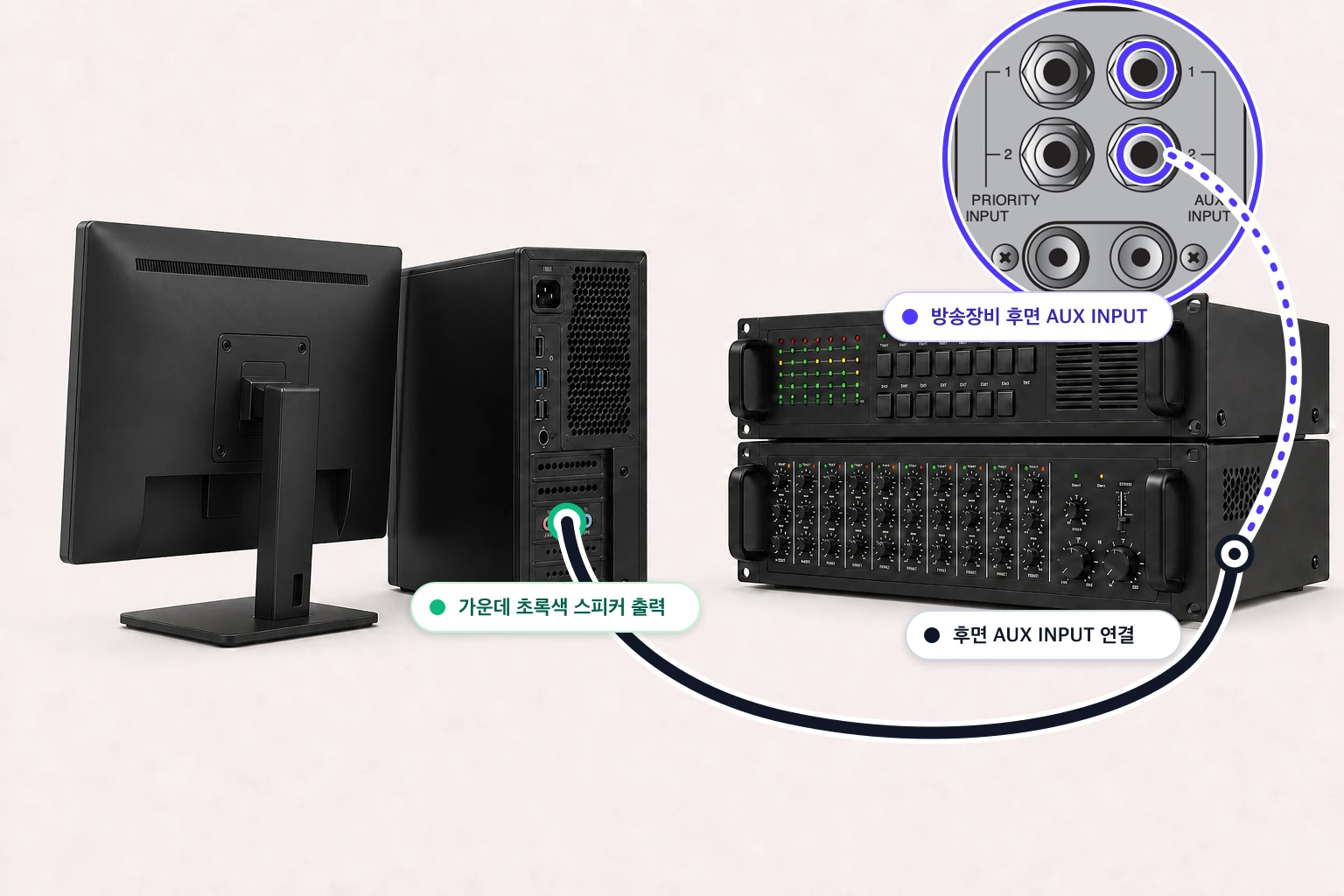
How do I connect my broadcast equipment to a computer?

You add the computer's audio signal to your existing broadcast equipment like a microphone. Once connected, write your content in WeMakeVoice and press Broadcast, and the audio plays through your equipment. With the connection kit (a selector, small speaker, noise filter, and three cables — KRW 83,000 incl. VAT), setup takes about 3 minutes; if you can run a test broadcast in your own environment, you don't need to buy it.

If the internet drops briefly, does the broadcast stop?

Scheduled broadcasts are pre-downloaded to the broadcast box and air normally even if the internet drops. When the connection is restored, broadcast logs sync to the cloud automatically. Only instant airing (live scripts) requires an internet connection.

Can I use it alongside the music (BGM) playing in my store?

Yes. You can integrate with other music programs or use the WeMakeVoice BGM library. When an announcement starts, the BGM lowers automatically and rises again when the script ends (auto-ducking).

We have many foreign customers — is multilingual guidance possible?

Yes. One script is auto-translated into Korean, English, Chinese, and Japanese, so you can create multilingual announcements where English follows Korean, and so on. We support 40 languages with natural, native-level voices.

Will I be billed automatically after the free trial?

No. The free trial starts without registering a card and ends automatically after one month. To keep using it, simply choose a paid plan yourself. You can try it with confidence and no payment pressure.

How do I confirm a broadcast aired correctly?

Broadcast logs are recorded automatically. You can see which script aired at what time and from which IP it was played.

Where can I use it?

It's used in all kinds of spaces that need announcements — apartments and officetels, buildings, hospitals and nursing hospitals, malls and marts, unmanned stores, government offices, piers, campsites, cafes, and more. Apartments and officetels can broadcast without issue by connecting to existing public-address equipment.

Can I run multiple stores (branches) from one account?

One account is built around running a single location. To manage 3 or more branches centrally from headquarters, we recommend the Premium membership. For details, please contact customer support.

How much does it cost?

Choose a plan that matches your usage; an annual plan saves you up to 40%.

See membership pricing →
Can I pay as a business (with a tax invoice)?

Yes. We support a range of payment methods — credit, debit, and corporate cards, bank transfer, auto-debit, and PayPal — and offer monthly or annual electronic tax invoices and bank-transfer payment. Annual billing saves up to 40%.

WeMakeVoice

The surest way is to just try it.